
WoW Forever Questie: Forever Build and Install
Which Questie file runs on Forever, and how to install all of it.
 By HarenilPublished Updated
Yes, Questie runs on WoW Forever, and it has been shipping fixes almost daily since launch. Grab the Forever file, keep both folders from the zip, and skip whatever Classic copy you hoarded.
Ask Our Sweaty Degenerate AI About Questie
Install Questie for WoW Forever, What to Check After Installing, Questie Commands and Controls, What Questie Changed for Forever & More
Anything our guides cover. Answers come from this page and the rest of our guides, with the real values charted and the guide sections linked. It's AI, so check the source before you quote it.
TL;DR
Questie has a Forever build, v12.6.4+v1.0.12, released November 7, 2026. Install the Questie and QuestieDB folders to _forever_\Interface\AddOns.
- Forever buildYes. Questie v12.6.4+v1.0.12 was published November 7, 2026.
- Supported patchWago Addons lists that release for Forever patch 1.60.1.
- TOC file`Questie_Forever.toc` declares `## Interface: 16001`.
- Download contentsReleases are tagged as bundles, and Questie's docs say a bundled build includes the required QuestieDB addon.
- Arrow to objectivesThis feature requires the separate TomTom addon.
On This Page
Does Questie Have a WoW Forever Build?
Yes. Questie's own GitHub releases carry Forever work. The project published six bundles dated November 4 through 7, and the last five are below.
Swipe sideways to see all columns.
| Bundle | Published (UTC) | Forever-relevant note |
|---|---|---|
| v12.6.0+v1.0.10 | Nov 4, 2026 | Launch-day release |
| v12.6.1+v1.0.11 | Nov 5, 2026 | QuestieDB: "[Forever] Update all databases" |
| v12.6.2+v1.0.11 | Nov 6, 2026 | Addon compartment entry, map coordinate setting fix |
| v12.6.3+v1.0.12 | Nov 7, 2026 | Taint and world map button fixes |
| v12.6.4+v1.0.12 | Nov 7, 2026 | "Auto-hide Questie dropdown menus on WoW Forever" |
The table comes from each bundle's release notes.Source: Questie GitHub releases, checked Nov 8, 2026. Wago Addons shows the same v12.6.4+v1.0.12 label with Forever patch 1.60.1 as its target.Source: Questie on Wago Addons, checked Nov 8, 2026. A publisher's patch tag is not a test of every quest, so report what you find to the project.
Install Questie for WoW Forever
Questie's README suggests the CurseForge client for managing addons, and offers the latest GitHub release as the alternative.Source: Questie README, Download, checked Nov 8, 2026. Choose your Forever installation in the app and install from its Forever section.
To install by hand:
- Close World of Warcraft.
- Download the latest Questie release zip.
- Unzip the file.
- Move
QuestieandQuestieDBintoAddOns. - Start the game.
- Enable both addons in the AddOns list.
The Forever destination is World of Warcraft\_forever_\Interface\AddOns. Questie's own Installation Guide still shows Classic paths such as _classic_, so don't copy that folder name. Our addon install guide covers finding the folder and fixing a bad unzip.
Release notes give QuestieDB its own version number, so keep both folders if your zip holds both. Questie's FAQ says to have only one version of Questie installed.
What to Check After Installing
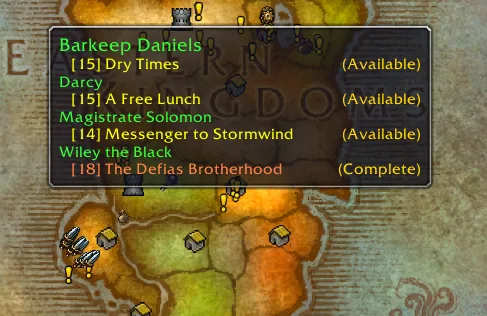
Open your map first. Questie's README lists map icons for quest givers and objectives, a tracker, and a journal.Source: Questie README, Features, checked Nov 8, 2026.
- Map icons show quest givers and objectives.
- Hold Shift over an icon for quest XP.
/questie journeyopens the journey window.- Right-click a tracked quest for more options.

The arrow to an objective needs TomTom, per the README. TomTom has its own Forever release: Wago Addons lists v4.4.1-release for patch 1.60.1.Source: TomTom on Wago Addons, checked Nov 8, 2026. Install it the same way if you want the arrow. Questie's FAQ says to right-click a quest or objective in the tracker to set the TomTom target.Source: Questie FAQ, item 12, written for Classic, checked Nov 8, 2026.
Questie Commands and Controls
These commands come from Questie's current code, so they apply to the Forever build.Source: QuestieSlash.lua, master branch, checked Nov 8, 2026.
| Command | What it does |
|---|---|
/questie | Opens the settings window |
/questie toggle | Shows or hides Questie on the map and minimap |
/questie minimap | Shows or hides the minimap button |
/questie journey | Opens the My Journey window |
/questie tracker reset | Resets the tracker; show and hide also work |
/questie tomap npc or object | Adds map markers by ID or name; reset clears them |
/questie doable | Checks whether you can do a quest ID |
/questie version | Prints Questie and client version info |
Questie's FAQ adds three controls, though it was written for Classic and may not all carry over.Reported, press or datamine, not confirmedSource: Questie FAQ, items 13, 15 and 17, checked Nov 8, 2026.
- Ctrl and left-click moves the tracker.
- Shift and left-click hides a quest.
- Blue exclamation marks are repeatable quests.
What Questie Changed for Forever
Questie's Forever support goes beyond a new TOC file, since its release notes list Forever-only work from October on.Source: Questie GitHub releases and older releases, bundle notes v12.0.4 to v12.6.4, checked Nov 8, 2026.
| Bundle date | Forever change |
|---|---|
| Oct 6 | Forever Wowhead links; map tooltips under the gamepad cursor |
| Oct 12 | Current Forever dungeons in the Journal; quest data refreshed from an October 10 snapshot |
| Oct 12 | Darkmoon Faire disabled "for now" |
| Oct 23 | Reputation bonus now counts the Legacy Tree Diplomat talent; library book quests and map clicks in combat fixed |
| Nov 2 | NPC ranks added |
| Nov 7 | Secret value errors on instance chat links fixed |
The Diplomat line matters if you spent Legacy points on reputation, since Questie's numbers now account for it.
If Questie Looks Wrong
Update first, because the fixes are arriving fast. The v12.6.3 bundle fixed a QuestLogCache error and "Questie tried to call the protected function X" errors, and v12.6.4 tackled more tracker behavior.Source: Questie GitHub releases, checked Nov 8, 2026.
- Marked out of date: Replace it with the Forever file.
- Quest data looks wrong: Update
QuestieDBwithQuestie. - Missing after install: Check both folders sit in
AddOns. - Need the error text: Type
/console scriptErrors 1. - Minimap button is gone: Type
/questieto open settings. - "Addon already exists" error: Remove the extra Questie copy.
Questie's FAQ says to test with every other addon disabled first. As a last resort, it says to close the game and delete Questie.lua and Questie.lua.bak from WTF\Account\<yourAccount>\SavedVariables, which also deletes your Journey.Source: Questie FAQ, items 2, 16 and 20, written for Classic, checked Nov 8, 2026. On Forever, use the WTF folder inside _forever_.
Questie's repository also carries a Questie_Camelot.toc beside Questie_Forever.toc, so leave that file in place if you see it.Source: Questie repository, file listing, checked Nov 8, 2026. Report bugs with the complete error text on Questie's issue tracker, as the README asks.
Known Gaps on Forever
Questie is still catching up with how Forever quests work. These issues were all open on November 8, and several describe quest types the addon can misread:Source: Questie issues 7929, 7930, 7931, 7966 and 8001, checked Nov 8, 2026.
- Quests with sequenced objectives (issue 7930).
- Quests with optional objectives (issue 7929).
- Objectives that can finish in random order (issue 7931).
- Not every objective type showing (issue 7966).
- Darkmoon Faire support (issue 8001).
If a marker looks wrong on one of these, check the quest text in your log before you run to the marker.
Questie or a Paid Route Guide
Questie shows you quests on the map; it doesn't plan your route. If you want a planned order of quests, read RestedXP vs Questie before installing both. It covers what each project documents about running them together. Zygor Guides is the other paid route option, and the leveling addons roundup lists the free ones, including Guidelime.
Not Announced or Unresolved
- Forever quest coverageNo coverage figure for Forever's quest data was found.
Every row carries an evidence icon: Confirmed, Planned, Reported, Unverified or Not announced. Hover, focus or tap one for its source. Where sources disagree, both stay on the page. How we verify
Sources
- Questie GitHub releases
- Questie GitHub releases, older page
- Questie docs: QuestieDB integrationQuestie docs
- Questie repository: Questie_Forever.tocQuestie repository
- Questie README
- Questie FAQ
- QuestieSlash.lua
- Questie issue 7929: optional objectivesQuestie issue 7929
- Questie issue 7930: sequenced objectivesQuestie issue 7930
- Questie issue 7931: objectives in random orderQuestie issue 7931
- Questie issue 7966: objective typesQuestie issue 7966
- Questie issue 8001: Darkmoon FaireQuestie issue 8001
- Questie wiki: Installation GuideQuestie wiki
- Questie on Wago Addons
- TomTom on Wago Addons
Confirmed, a first-party source
Press · Questie GitHub releases
Confirmed, a first-party source
Press · Questie on Wago Addons
Confirmed, a first-party source
Confirmed, a first-party source
Press · Questie docs: QuestieDB integration
Confirmed, a first-party source
Not announced, nothing on record