
WoW Forever Accessibility Settings
 By HarenilPublished
Need clearer color cues, less camera movement, a larger pointer, or mouse-based movement? The saved 1.60.1.70205 client defines related controls, while Sardaco's September 18 footage shows their surrounding menu labels; footage build unverified.
Ask Our Sweaty Degenerate AI About Accessibility Settings
Colorblind Mode, Photosensitivity, Camera Shake, Cursor Size, Move Pad & More
Anything our guides cover. Answers come from this page and the rest of our guides, with the real values charted and the guide sections linked. It's AI, so check the source before you quote it.
TL;DR
Client code defines Photosensitivity Mode, Motion Sickness, Camera Shake, Cursor Size and Show Move Pad under Accessibility > General (Reported, 70205).
On This Page
Match a Need to a Control
“Reported” rows come from the saved 1.60.1.70205 client source. “Observed” rows describe Sardaco's September 18 footage; its build is unverified. A visible checkbox state is one frame, not a recommended default.
| Control (need) | Category, defined values or visible state, evidence |
|---|---|
| Enable UI Colorblind Mode (more color cues) | Accessibility (colorblind category). Checkbox; tooltip says it adds information to tooltips and other interfaces.Reported, 70205 |
| Colorblind Filter (color distinctions) | Accessibility (colorblind category). None; 1. Protanopia; 2. Deuteranopia; 3. Tritanopia.Reported, 70205 |
| Adjust Strength (filter intensity) | Accessibility (colorblind category). 0–100%, in 5% steps; editable with a filter selected.Reported, 70205 |
| Enable Photosensitivity Mode (screen effects) | Accessibility > General. Checkbox; tooltip names white fades and bright spells as examples of effects it may modify.Reported, 70205 |
| Motion Sickness (camera movement) | Accessibility > General. Checkbox; tooltip describes reduced movement and centering, but the saved code turns CameraKeepCharacterCentered off when enabled. The centering wording conflicts with the code.Reported, 70205 |
| Camera Shake (camera and UI shake) | Accessibility > General. None; Reduced; Full.Reported, 70205 |
| Cursor Size (pointer visibility) | Accessibility > General. Default; 32x32, 48x48, 64x64, 96x96, 128x128.Reported, 70205 |
| Show Move Pad (mouse-based movement) | Accessibility > General. Checkbox; tooltip describes a clickable frame for movement and jumping.Reported, 70205 |
| Sticky Targeting (target selection) | Gameplay > Controls. Checked in the frame. (Observed; footage build unverified) |
| Interact On Left Click (mouse interaction) | Gameplay > Controls. Checked in the frame. (Observed; footage build unverified) |
| Auto Loot Key (looting input) | Gameplay > Controls. SHIFT key shown. (Observed; footage build unverified) |
| Enable Interact Key (interaction input) | Gameplay > Controls. Unchecked in the frame. (Observed; footage build unverified) |
| Interact With Target (target interaction) | Gameplay > Controls. Both bindings show Not Bound. (Observed; footage build unverified) |
| Mouse Look Speed (camera input) | Gameplay > Controls. 5.5 shown. (Observed; footage build unverified) |
| Enable Mouse Sensitivity (mouse input) | Gameplay > Controls. Unchecked; adjacent slider shows 6. (Observed; footage build unverified) |
The colorblind code names its category through a label function not resolved in this extract; footage shows a Colors entry.
The saved client defines the reported controls and tooltip wording, not their live menu behavior or effect in play. It registers a General category in the Accessibility settings group; that code registration alone does not establish a click-by-click path.
Categories in the Footage
The video shows the Accessibility tree labels Interface, Audio Assist, Subtitles, General and Colors. Gameplay > Controls is open beside it. The frame shows those labels and the listed control states, but it does not open the Accessibility categories.
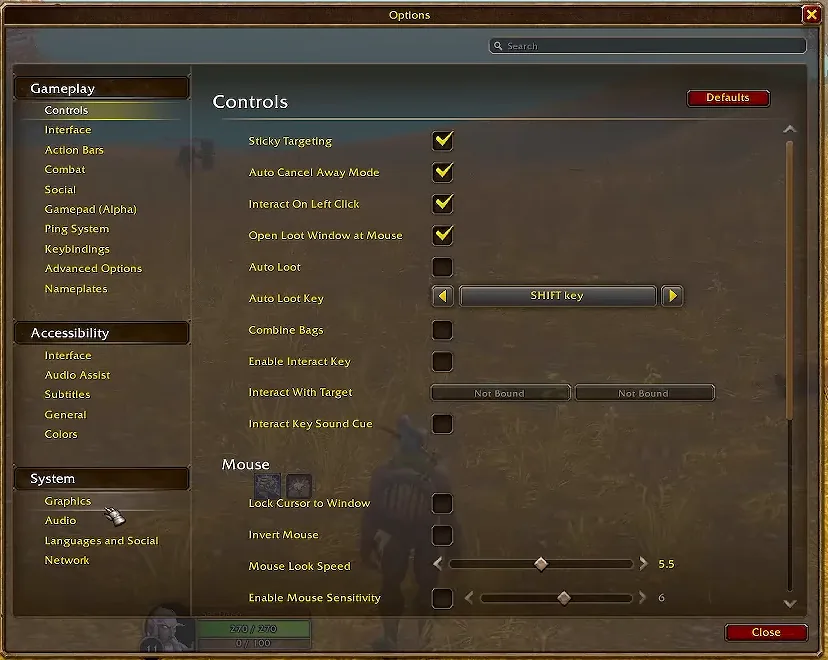

Shown in Sardaco's September 18, 2026 beta walkthrough; footage build unverified.
Audio Assist and Subtitles appear as category labels, but this footage does not show their controls. Their contents are not described here.
For the surrounding interface, continue to UI setup. For tracked spells, use the native Cooldown Manager reference. See also quality-of-life settings and gamepad support.
Accessibility FAQ
Does the footage confirm these labels in build 1.60.1.70205?
No. The creator footage is dated September 18, 2026, but its game build is unverified. The option definitions come from a separate saved client extract.
Which controls appear under Audio Assist and Subtitles?
The footage shows those category names, not their contents, so it cannot establish which controls they contain.
Were the setting effects tested in-game?
No. The client files define labels, values, and tooltip text. This page does not test gameplay results or whether settings persist.
Every row carries an evidence icon: Confirmed, Planned, Reported, Unverified or Not announced. Hover, focus or tap one for its source. Where sources disagree, both stay on the page. How we verify