
How to install RestedXP for WoW Forever
Addon, Battle.net ID, import string, and the three import errors RestedXP names.
RestedXP's setup is three steps, and most of the trouble sits in the last one, where the guide string has to match your Battle.net ID.
Quick answer
Install the free RestedXP addon (CurseForge lists a WoW Forever file), add your Battle.net ID to your RestedXP account, then export your guide string and choose Import guide in game.
- Step 1"Download the latest version of the RestedXP addon", after deleting any older copy.
- Forever fileCurseForge lists a "WoW Forever" file for the addon, v4.11.11 from September 25.
- Step 2Guides are "bound to your account and Battle.net-ID"; add the ID in your account section.
- Step 3Export the guide string from Downloads, then right click the addon overlay and choose Import guide.
- PlatformsRestedXP supports "Windows and Mac at the moment".
Nothing ruins a fresh level 1 like an addon that loads but will not take your guide. The steps and the fixes below are RestedXP's own, in the order you need them.
On this page
Before you start
You need the Forever Leveling Guide on your RestedXP account: Horde, Alliance, or both factions. Prices and the roadmap are on RestedXP's WoW Forever guide page. RestedXP says the product is not yet fully complete, so expect routes to arrive in updates.
The addon itself is free; what RestedXP gives away for free explains where the paid part starts.
Step 1: install the addon
RestedXP's first step: "If you have an older version of RestedXP installed, delete the addon in your addon folder. Now, download the latest version of the addon."
Get it from RestedXP's download page, CurseForge or GitHub. On CurseForge, pick the file marked WoW Forever. On September 28 that was v4.11.11.
Step 2: connect your Battle.net ID
RestedXP binds purchased guides to one player: "Your RestedXP guides are now bound to your account and Battle.net-ID. You are the only person that can access and use your guides."
Add your Battle.net ID in the account section of RestedXP's site before you export anything. A missing or wrong ID causes two of the three import errors below.
Step 3: import the guide in game
In RestedXP's words: open Downloads in your account section, click "Export" to download the string file, copy the whole string, then "Right click the addon overlay in-game and select 'Import guide' to open the import window."
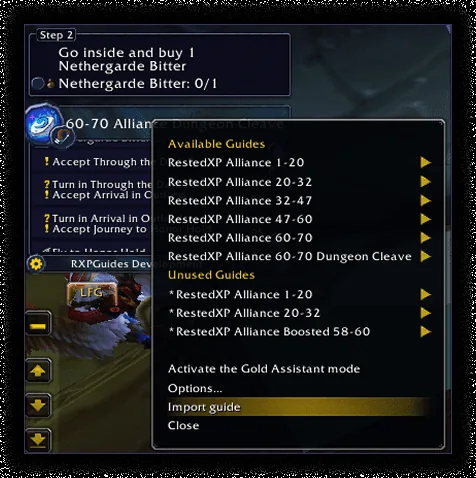
You only need to be online for that first import. RestedXP's Help Center says the addon detects your Battle.net login after that, and that you go online again to import later updates.
Import errors and fixes
| Error | What RestedXP says it means | Fix |
|---|---|---|
| undefined | Your Battle.net ID is not set on RestedXP's site | Add it in your account, export again |
| Invalid Value | The guide did not connect to your Battle.net | Appear online or restart the game |
| Invalid Import String | Your Battle.net ID does not match the account's | Open a ticket in RestedXP's Discord |
These are the three errors RestedXP's Help Center lists as most common. For bugs in the addon itself, RestedXP has a separate bug report page; its contact form is for account and payment questions.
Not announced or unresolved
- Forever setup pageRestedXP's setup manual does not mention WoW Forever yet; its steps are general.Not announced
Frequently asked questions
Does RestedXP work in the WoW Forever beta?
The addon lists a Forever file on CurseForge, and its release notes add Forever routes for beta zones such as Durotar and Mulgore. RestedXP's setup manual does not mention Forever, and we have not tested it in the beta.
Do I have to reinstall for updates?
RestedXP says product updates are "100% free of charge" and that you import them the same way, online. Update the addon itself from the same place you installed it.
Does RestedXP work on Linux or Steam Deck?
RestedXP supports Windows and Mac. Its terms say using an unsupported platform "forfeits your eligibility for a refund", so check before you buy.
Where do I compare RestedXP with Zygor's setup?
Zygor installs through its own desktop client instead of an import string. RestedXP vs Zygor for WoW Forever sets both setups side by side.
Every row carries its evidence tier: Confirmed, Planned, Reported, Unverified or Not announced. Where sources disagree, both stay on the page. How we verify
Sources
Confirmed, a first-party Blizzard source
Press · RestedXP getting started
Confirmed, a first-party Blizzard source
Press · RestedXP Guide on CurseForge
Confirmed, a first-party Blizzard source