
WoW Forever HUD Edit Mode Controls
A footage-led map of HUD Edit Mode controls and the Buff Frame panel.
 By HarenilPublished
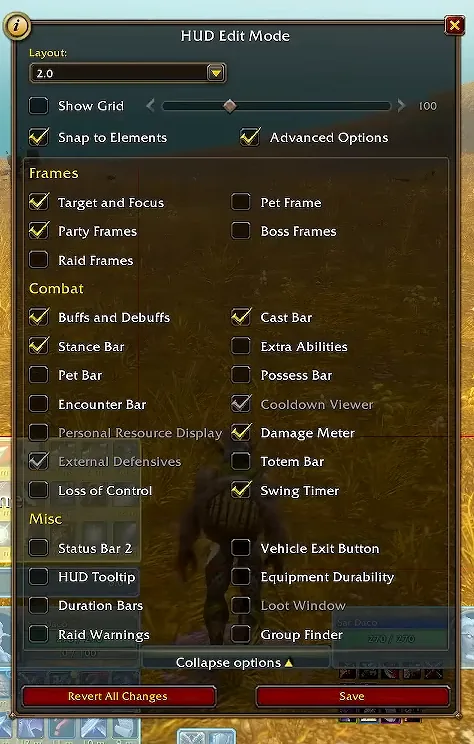
HUD Edit Mode groups layout controls under Frames, Combat and Misc, with Grid, Snap, Advanced Options, Save and Revert All Changes nearby. This reference maps Sardaco’s September 18 footage; its client build is unverified.
Ask Our Sweaty Degenerate AI About HUD Edit Mode
Frame Groups, Grid & Snap, Buff Frame Fields, Revert Changes, Cooldown Manager & More
Anything our guides cover. Answers come from this page and the rest of our guides, with the real values charted and the guide sections linked. It's AI, so check the source before you quote it.
TL;DR
September 18 footage (build unverified) shows HUD Edit Mode’s Frames, Combat and Misc groups, Grid, Snap, Save and Revert All Changes.
- Main panelSardaco’s September 18 walkthrough at 5:00 shows the Layout value, Show Grid, Snap to Elements, Advanced Options, element groups, Save and Revert All Changes.
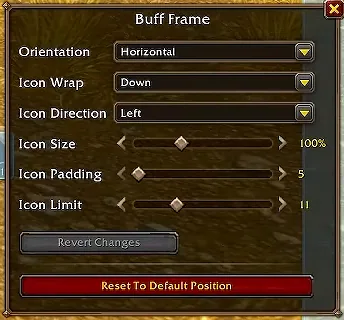
- Buff FrameThe same footage shows Orientation, Icon Wrap, Icon Direction, Icon Size, Icon Padding and Icon Limit values.
On This Page
Control Reference
At 4:00 the same footage shows an Edit Mode button beside Enable Cooldown Manager in the Cooldown Manager section of Advanced Options; the recording does not show what it opens.
| Area | Labels visible, what the footage establishes, evidence |
|---|---|
| Top controls | Layout dropdown shows 2.0; Show Grid slider displays 100; Snap to Elements; Advanced Options. 2.0 is the displayed layout name, not evidence of a count or version. The slider’s displayed value is 100; no default or range is established. (Reported; build unverified) |
| Frames | Target and Focus; Party Frames; Raid Frames; Pet Frame; Boss Frames. These frame-group checkbox labels are visible. (Reported; build unverified) |
| Combat | Buffs and Debuffs; Stance Bar; Pet Bar; Encounter Bar; Personal Resource Display; External Defensives; Loss of Control; Cast Bar; Extra Abilities; Possess Bar; Cooldown Viewer; Damage Meter; Totem Bar; Swing Timer. These checkbox labels are visible. Personal Resource Display, External Defensives and Cooldown Viewer appear dimmed; the footage gives no reason. (Reported; build unverified) |
| Misc | Status Bar 2; HUD Tooltip; Duration Bars; Raid Warnings; Vehicle Exit Button; Equipment Durability; Loot Window; Group Finder. These checkbox labels are visible; Loot Window appears dimmed. (Reported; build unverified) |
| Footer | Collapse options; Revert All Changes; Save. These control labels are visible; the footage does not demonstrate their effects. (Reported; build unverified) |

Buff Frame Controls
The crop shows the labels and values in one frame. These values are not established defaults or ranges.
| Field | Displayed value or state, evidence |
|---|---|
| Orientation | Horizontal. (Reported; build unverified) |
| Icon Wrap | Down. (Reported; build unverified) |
| Icon Direction | Left. (Reported; build unverified) |
| Icon Size | 100%. (Reported; build unverified) |
| Icon Padding | 5. (Reported; build unverified) |
| Icon Limit | 11. (Reported; build unverified) |
| Revert Changes | Dimmed in the shown frame. (Reported; build unverified) |
| Reset To Default Position | Label visible; action not demonstrated. (Reported; build unverified) |

What the Footage Does Not Show
- Creating a layout or setting its character scope.
- Saving and reopening a layout.
- Import, export, copy, backup or recovery.
- Why Cooldown Viewer appears dimmed.
- Slider defaults or allowed ranges.
The visible Save button does not establish persistence. The recording also does not demonstrate a save, reopen, import or export workflow.
The native Cooldown Manager reference preserves its dated menu paths. The accessibility control reference maps visual and input options. For your first session, start with the new-player guide.
Saving FAQ
Does Save prove the layout will persist?
No. The footage shows the button, but it does not demonstrate saving a layout and reopening it.
Why is Cooldown Viewer dimmed?
It is dimmed in the shown frame. The recording gives no reason.
Every row carries an evidence icon: Confirmed, Planned, Reported, Unverified or Not announced. Hover, focus or tap one for its source. Where sources disagree, both stay on the page. How we verify
Sources
Reported, press or datamine, not confirmed