
WoW Forever Mouseover Cast and Click Casting
Choose keyboard mouseover casting or mouse-button bindings, then test a helpful spell.
 By DecarebiaPublished
Use Mouseover Cast for a keyboard hotkey over a unit frame; use Click Cast Bindings to put a spell or macro on a mouse-button click. The routes below are defined in a dated client snapshot and player reports.
Ask Our Sweaty Degenerate AI About Click Casting
Mouseover Hotkeys, Click Cast Bindings, Macro Setup, Heal Testing & More
Anything our guides cover. Answers come from this page and the rest of our guides, with the real values charted and the guide sections linked. It's AI, so check the source before you quote it.
TL;DR
Search Options for mouseover to set up keyboard casting over a unit frame. For a mouse-button binding, the retained client defines Options > Keybindings > Click Casting.
On This Page
Choose by Input
Both methods act on a unit frame with different inputs: a keyboard hotkey under the pointer, or a mouse-button click assigned to a spell or macro. The inspected Forever client source is build 1.60.1.70205, retrieved October 3, 2026; it is a dated snapshot, not a latest-build or live-cast test.
Swipe sideways to see all columns.
| Method | Choose it for | Availability in reviewed evidence |
|---|---|---|
| Native Mouseover Cast | Use a keyboard hotkey on the unit beneath the pointer. | The 1.60.1.70205 Camelot source supports a conditional setting; a player reported finding it through Options search for mouseover. (Client source; player report, September 30, 2026) |
| Click Cast Bindings | Put a spell or macro on a mouse-button click over a unit frame. | The client registers this control under Keybindings and provides a spell/macro then hover-and-click workflow. (Client source, 1.60.1.70205) |
| Mouseover macro | Use a macro-specific setup or syntax. | Click bindings accept a macro; standalone mouseover syntax is unverified here. See macro setup. (Client source; September 30 report) |
See UI setup for surrounding interface changes.
Set Up a Keyboard Hotkey Over a Unit
The inspected client conditionally registers the checkbox when mouseover support and its CVar are available. The separate Mouseover Cast Key uses an Alt, Ctrl or Shift modifier. Camelot defaults that modifier to NONE, displayed as “No key set.” (Client source, 1.60.1.70205)
A Forever beta player reported searching Options for mouseover and enabling the setting. Check the hotkey you intend to use. The tooltip describes casting on the hovered frame without targeting it; the exact route beyond search and checkbox is unverified. (Client source, 1.60.1.70205; player report, September 30, 2026)
A September 30 player described helpful-spell fallback to the selected target, then the player, when no unit is hovered. This is one report, not a universal guarantee; test the recipient. (Player report, September 30, 2026)
Assign a Spell or Macro to a Click
The retained client source supports this setup sequence:
- Open Options > Keybindings > Click Casting.
- Choose a spell or macro.
- Hover the binding and click a mouse button.
The opened panel is titled Click Cast Bindings.
The source establishes the registered panel and its prompts, not a successful cast. Sardaco's September 18 frame shows Options navigation and Keybindings only, not this panel or a saved binding. (Client source, 1.60.1.70205; video footage build unverified)
If holding right-click to turn the camera drops your target, one beta player fixed it in Click Casting. They changed “Right Click for Context Menu” to Alt + Right Click. One report, not a default. (Player reports, October 7, 2026)
Test One Spell Before Group Use
Suggested check (editorial): test one learned helpful spell with a willing friendly player. Hover their unit frame and use the chosen hotkey or assigned mouse button. Confirm the recipient; adjust and repeat if unclear before group use.
Two players reported the Options setting working on September 30, one for heals. The client source establishes setup only. These reports do not cover every spell, rank, frame addon or build; verify behavior in your interface. (Client source, 1.60.1.70205; findings checked October 8, 2026)
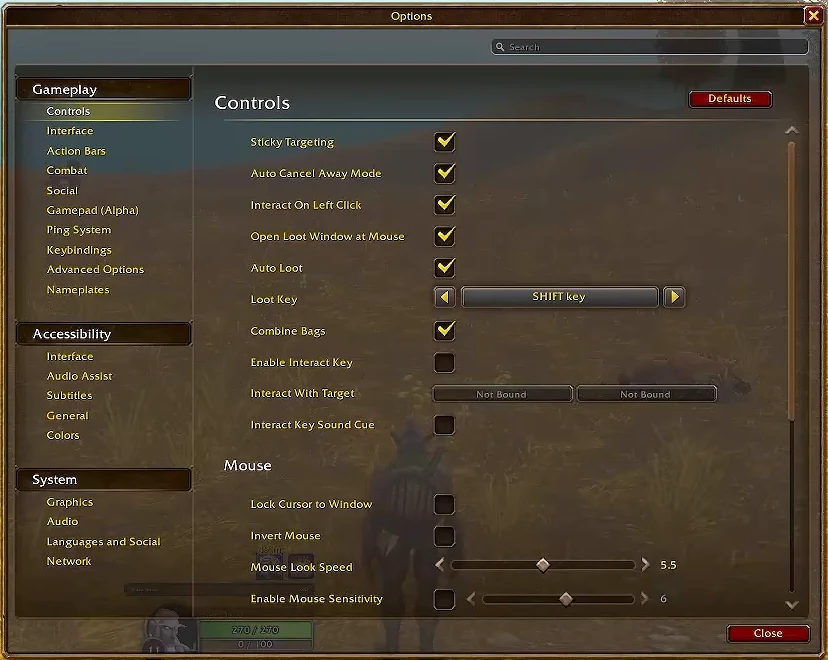

Options navigation at 06:20. This frame shows Keybindings, not the binding panel or a successful cast.
Every row carries an evidence icon: Confirmed, Planned, Reported, Unverified or Not announced. Hover, focus or tap one for its source. Where sources disagree, both stay on the page. How we verify