
WoW Forever Quality-of-Life Changes
Every announced convenience change, what it does for you, and how sure we are it ships.
 By HarenilPublished Updated
Announced changes include a Classic or enhanced mode, SD and HD models, gamepad support, a Cooldown Manager, opt-in transmog and campfires.
Ask Our Sweaty Degenerate AI About Quality-of-Life Changes
Classic Mode, SD and HD Models, Gamepad Support, Cooldown Manager & More
Anything our guides cover. Answers come from this page and the rest of our guides, with the real values charted and the guide sections linked. It's AI, so check the source before you quote it.
TL;DR
Announced changes include a Classic or enhanced mode, SD and HD models, gamepad support, a Cooldown Manager and damage meter, opt-in transmog, campfires, and Legacy perks for travel.
- Player-choice optionsOfficial gamepad support, opt-in Transmog, visual presets, and SD or HD character models
- Built-in toolsDevelopers name a damage meter and Cooldown Manager, with a swing timer
"perhaps coming soon"
- Gamepad swing timerUnder Gamepad Support, the October 15 notes say
"Added a swing timer to the center reticle."
The Evidence, 4 facts
- Beta controlsSeptember 24 notes add the Cooldown Manager, Gamepad Alpha options, and class flyouts
- October 1 betaCooldown Manager adds Rogue and racials, gamepad UI bindings become static, and Character Creation shows matching icons for SD models
- Ping systemShown in creator footage, not in a Blizzard article
- Held back on purposeNo flying mounts and no level scaling
Forever adds convenience in specific places and holds back in others, because Blizzard says every quality-of-life choice can shape how players meet and play together. This checklist covers each announced change, what it does in play, and where the line currently sits.
On This Page
November 2 Controller, Inventory and Quest Changes
Gamepad support is in a functional Beta state, using Blizzard’s corrected November 2 wording. All major gameplay and core UI can be played with a controller; settings can be customized through Edit Mode and Options. Select your assigned Focus Target with LB + RB + Face Down. Friendly corpses, hostile critters, enemy-player targeting and visible units behind you get targeting updates; attackable Feign Death units require the reticle over them.
Ground-targeted AoE items confirm with another action-bar press. Pet Move confirms with Interact or another activation. Back/Cancel ends a flight at the next available flight point. Bags gain free-space/ammo indicators and Keyring/search improvements, alongside inventory, popup-focus, profession-training, tooltip, cinematic and ruleset-selection fixes. The Off-Hand Swing Timer login issue on dual-wielders is fixed. See gamepad support guide for the full list.
More detailLess detailThese notes do not establish full remapping, removal of the Alpha menu…1 paragraph, 42 words
These notes do not establish full remapping, removal of the Alpha menu label, changed hardware requirements or a fix to the older layout-reset issue.Source: Blizzard, November 2 beta notes, Gamepad Support and subheadings; corrected official post verified Nov 3, 2026.
New bags must be equipped manually; they no longer fill available bag slots automatically. Learning a new spell no longer adds it to an action bar automatically. Global quest fixes adjust some XP, requirements, objective tooltips, map markers, log sorting and item/abandon behavior; exact new XP and prerequisite graphs are not supplied.
More detailLess detailLaunch respawn tuning is fastest in starting areas and generally slows with…1 paragraph, 45 words
Launch respawn tuning is fastest in starting areas and generally slows with level, with lower-level rates planned to return to more typical values after the initial surge.Source: Blizzard, November 2 beta notes, Items > Bags; Classes; Quests and World, verified Nov 3, 2026.
Setup and Visuals
You choose how Forever looks: SD or HD models, a modern or Classic presentation and controller support are confirmed, and a Classic or enhanced mode at first login is planned.
Swipe sideways to see all columns.
| Change | Evidence | What it means for you |
|---|---|---|
| Classic or enhanced mode at first login | Classic turns off quest tracking and transmog automatically | |
| SD or HD character models | Toggle at character select or in graphics settings anytime | |
| Classic animations on HD models | HD models keep the original run, cast, and attack feel | |
| Modern and Classic visual presets | Choose a modern or Classic presentation | |
| Official gamepad support | All major gameplay and core UI with a controller; customize in Edit Mode/Options | Functional Beta state in corrected November 2 notes; old Alpha menu label not rechecked |
The developer Q&A at 01:08:00 covers the mode choice and also says the SD and HD switch lives in graphics settings. The Deep Dive recap separately confirms Classic Mode disables transmog on entry. For more, see SD and HD models and gamepad support.
Choose keyboard and mouse or Gamepad UI before arranging your layout. The October 1 build listed a layout-reset known issue.
More detailLess detailNovember 2 customization and Edit Mode fixes do not explicitly resolve that…1 paragraph, 134 words
November 2 customization and Edit Mode fixes do not explicitly resolve that issue; check the current client before relying on a saved layout.Confirmed, a first-party sourceSource: October 1 beta notes, Gamepad Support and Known Issues, checked Oct 1, 2026. Set comfortable keyboard and mouse controls with the keyboard and mouse setup, then choose SD or HD models and a Modern or Classic visual preset (announced) in the model guide.Confirmed, a first-party sourceSource: What's Next panel recap, checked Sep 17, 2026. Arrange the interface in Edit Mode, then decide whether to enable the Cooldown Manager under Options > Gameplay Enhancement; it is off by default.Confirmed, a first-party sourceSource: September 24 beta notes, Cooldown Manager and Gamepad Support, checked Sep 25, 2026.

Interface and Combat Information
The developers want you to feel you can play without downloading addons: the Cooldown Manager is in the beta, off by default, a built-in damage meter is planned, and the October 15 beta notes announce a swing timer for the gamepad center reticle. General-mode swing-timer availability remains unverified.
Swipe sideways to see all columns.
| Change | Evidence | What it means for you |
|---|---|---|
| Cooldown Manager | in beta; off by default | Pulls key buffs and cooldowns into one movable display |
| Built-in damage meter | Check group damage without an addon | |
| Swing timer | The earlier Q&A said "perhaps coming soon"Blizzard: World of Warcraft Developer Q&A, checked Sep 27, 2026.; October 15 notes announce one for the gamepad center reticle notes | Announced for the gamepad reticle; general mode unverified |
| Personal Resource Display and nameplates | in beta | Modern UI pieces, refreshed in the September 24 build; combo point art updated October 1 |
| Modern addon API | Addons build on the Retail API, not Classic's |
Leveling guide addons are already updating for that API. RestedXP's addon release notes list Forever route updates for Durotar, Mulgore, Teldrassil, and Darkshore.Source: RestedXP addon releases, v4.11.10, Sep 25, 2026. RestedXP's paid routes are covered on RestedXP for WoW Forever, and Zygor vs RestedXP compares the two guide makers side by side.
To test the Cooldown Manager, open Options and find it under Gameplay Enhancement. The September 24 notes say it supports Druid, Mage, Priest, Warrior, and Warlock, but does not yet handle spell ranks.
More detailLess detailThe October 1 build adds Rogue and racial abilities, and the duplicate…1 paragraph, 60 words
The October 1 build adds Rogue and racial abilities, and the duplicate entries for each spell rank on supported classes should be gone.Source: WoW Forever Beta Development Notes, October 1, Cooldown Manager, checked Oct 1, 2026. Known issues include untracked Healthstone and pet cooldowns, untracked weapon enhancements such as rogue poisons, and Priests tracking every spell by default.
Blizzard asks testers which spells they want tracked by default, so expect the list to change before launch. In the Q&A at 01:22:00, the developers say they want players to feel they can "jump in and play"
without downloading addons.Blizzard: World of Warcraft Developer Q&A, checked Sep 27, 2026. The addon guide explains the API choice.
Gamepad Details in the Beta
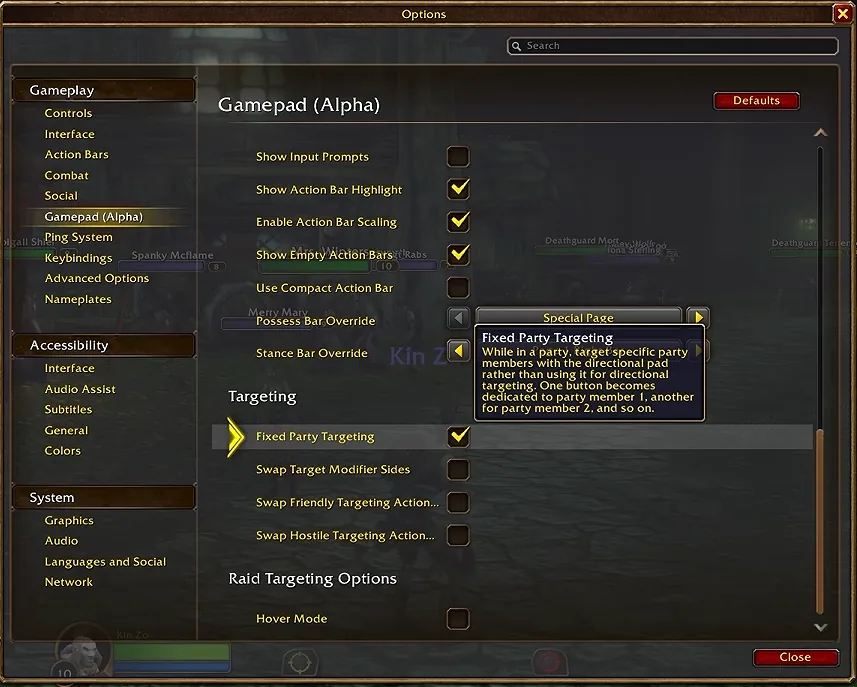
The beta gives controller players class flyouts, new targeting options and navigation at character select.
- Druid, Hunter, Warlock, Paladin, Warrior flyouts
- Compact Action Bar option
- Fixed Party Targeting on the directional pad
- Swappable friendly and hostile target sides
- Controller navigation at character select
- Interact with quest-starting items on gamepad
The last two come from the September 22 client updateConfirmed, a first-party source, and the rest come from the September 24 notes. The September 24 build also fixed edit mode layouts under the gamepad UI, updated map and quest log bindings, and added hover on map pins.

Transmog and Appearances
Transmog is opt-in, and appearances still collect while it is off. The Deep Dive recap says to visit a transmogrifier in certain cities to set outfits or disable the systemConfirmed, a first-party source. Three rules cut the hassle:
- Shared dungeon appearances: all eligible looters get the look.
- Poor and Common items: granted on loot, no binding needed
- Collecting while disabled: Appearances still collect with transmog off
That covers Bind-on-pickup Uncommon and Rare drops. Because of the shared-appearance rule, nobody has to roll against an upgrade just to get its look. Helm and cloak hiding still works with transmog off, and you still see other players' hidden slots. Only the winner gets the look of an Epic raid drop, and item-type rules still apply: plate to plate, cloth to cloth. See the transmog guide.
Leveling, Travel, and Recovery
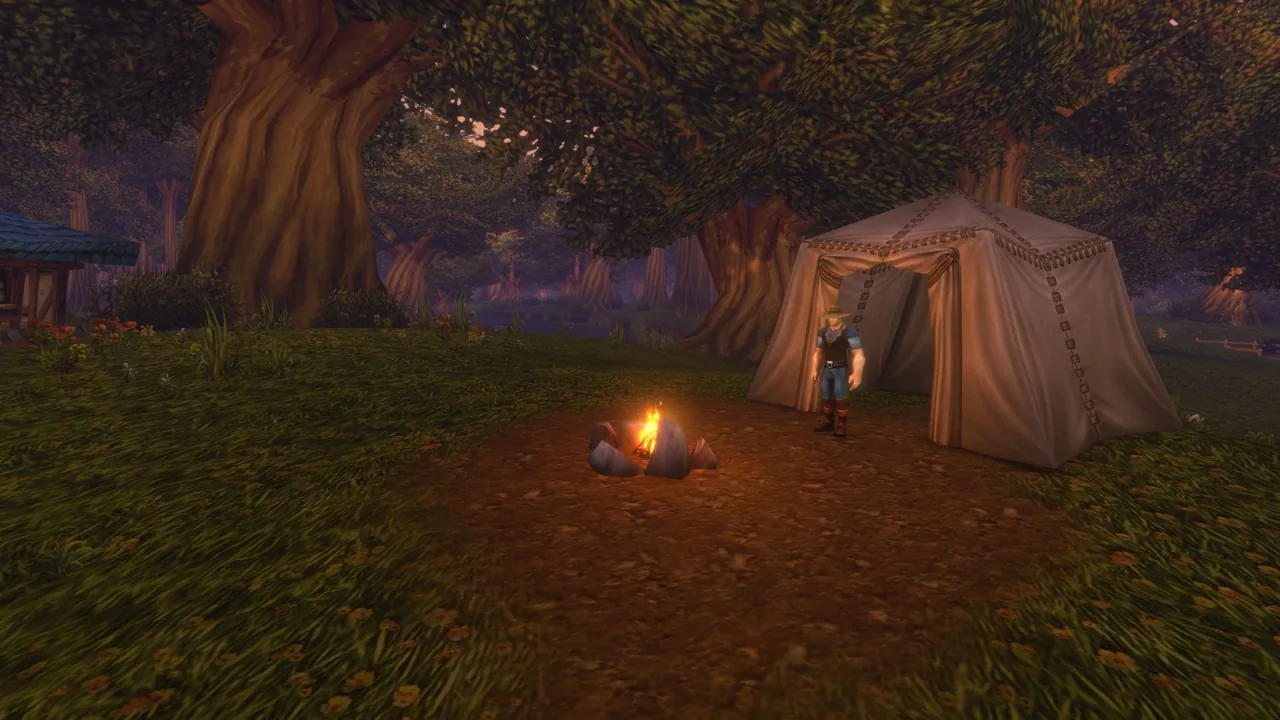
Campfires let you rest, repair and buy outdoors, and Legacy perks make flights and corpse runs faster, though each character can pick only some of them.
Swipe sideways to see all columns.
| Change | Evidence | What it means for you |
|---|---|---|
| Basic Campfire | Rest, repair, buy, craft, and take one-hour buffs outdoors | |
| Campfire buffs while busy | in beta | Sit, lie down, or kneel; buff, cast, and craft while waiting |
| Burning Crusade-style mount cost | Cost moves into riding training; you get a mount | |
| Legacy: Frequent Flier | Cheaper, faster flight paths | |
| Legacy: Talented | Talent points up to 5 levels early | |
| Legacy: The Quick and the Dead | Faster corpse runs and free rebuffs after a wipe | |
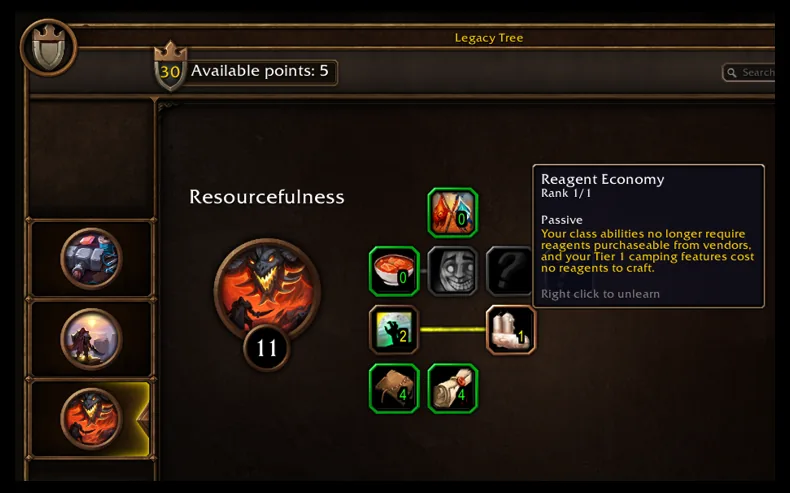
| Legacy: Reagent Economy | No purchasable reagents for class abilities | |
| Legacy: Reinforce and Field Medicine | Less death durability loss; shorter bandage lockout |
Campfire and mount details come from the Deep Dive recap, and the perks come from Blizzard's Legacy article. Each character spends up to 16 Legacy points at launch, so you pick a few of these, not all. The beta also charges 1 silver to respec if you have not reset recently, but Blizzard calls that "temporary for the Beta only."Blizzard: WoW Forever Beta Development Notes, checked Sep 27, 2026.
More on camping and Legacy.


Social and Account
You choose a ruleset instead of a realm, and every character needs a first name and surname.
- Rulesets instead of realms: Normal, PvP, Roleplaying, or later Hardcore.
- Two-part names: first name and surname, unique across the region.
- Language preference: set under Options, System, Languages and Social.
- Shared auction house: one per rulesetPlanned, first-party, in the future tense.
- Mail fix: The beta notes fixed mail that ignored surnames.
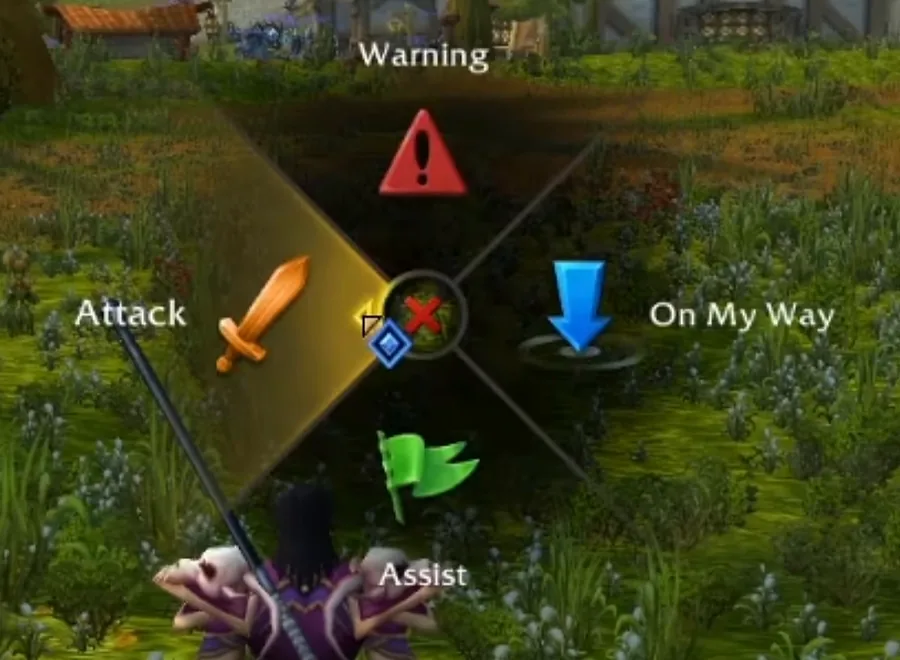
- Pings: creator footage shows a radial ping menu.
Choose a ruleset and you play with that whole ruleset; see realmless. The Q&A at 01:13:30 says every character needs a first name and surname. Blizzard's ruleset article says the language preference is account-wide with a 24-hour change cooldownConfirmed, a first-party source. The Q&A at 01:13:00 says an auction house spans the whole ruleset, including oceanic and US playersPlanned, first-party, in the future tense. Creator footage also shows ground markers, but Blizzard has not documented pings. See our ping report.

What Forever Holds Back
Don't expect every modern convenience: Blizzard's pillars treat some of them as costs. These are announced limits:
- No flying mountsPlanned, first-party, in the future tense
- No level scalingPlanned, first-party, in the future tense
- No cross-faction groups, per the ruleset articleConfirmed, a first-party source
- No flexible raid sizes at launch, per the Q&APlanned, first-party, in the future tense
- No GDKP raids, per the Q&A at 01:16:00Planned, first-party, in the future tense
- No WoW Token plansReported, press or datamine, not confirmed
No source announces an automated dungeon finder, meeting-stone summons, a built-in quest helper beyond quest tracking, or bank and bag changesNot announced, nothing on record. The group finder page tracks the queue question.
Interface Settings Worth Checking in the Beta
Hide Your Second Name in the World
One checkbox in Options hides your second name in the game world, though it still shows in chat. Every Forever character has two names, and the full combination must be unique in your region, so two players can share a first name or a family-style second name. Blizzard's naming article describes a setting for a simpler look: Game Menu (Escape), Options, Nameplates, then the "My Secondary Name"
checkbox.Blizzard: Create a Name of Your Own in WoW: Forever, checked Sep 28, 2026.
With it off, your secondary name no longer shows in the game world but still appears in chatConfirmed, a first-party source. The article does not say whether the setting changes what other players see. For keyboard bindings, camera movement and readable combat information, use the before-your-first-quest setup.
Controller Extras Beyond the Flyouts
On a controller, Hunters and Warlocks keep the bottom action bar, and raid frame support was updated. These two gamepad changes from the September 24 notes are not in the list above. The pet bar no longer replaces the bottom gamepad action bar for Hunters and Warlocks, and support for the Compact Raid Frame Manager and Role Poll frames was updated.Source: WoW Forever Beta Development Notes, September 24, checked Sep 28, 2026. The class changes guide lists each class's flyout.
The October 1 build updates the pet stable interface and the compact Raid and Party manager frames for gamepad support. Gamepad UI bindings are now static, and any gamepad rebinding only affects the keyboard and mouse interface. Macros placed on a gamepad action bar can now be moved. A new known issue says switching to or from Gamepad UI mode resets the active edit mode layout to the default preset.Source: WoW Forever Beta Development Notes, October 1, Gamepad Support and Known Issues, checked Oct 1, 2026.
What the Cooldown Manager Still Misses
More Tracking Gaps in This Build
Expect more tracking misses in the September 24 build: Blizzard's known issues list several beyond the ones above. Banes and Curses stop tracking correctly if you drop your target and then target one that already has them. Arcane Blast can't be tracked, and a Mage's Mana Gem needs one more spell cast before its cooldown starts tracking.Source: WoW Forever Beta Known Issues, September 24 section, checked Sep 28, 2026.
The Personal Resource Display does not show combo points yet, which matters for Rogues and Feral Druids. The October 1 build updates combo point art on the target frame and the Personal Resource Display, but Blizzard does not say whether that fixes the gap.
Two Issues Outside the Cooldown Manager
The same list reports two more problems: creating or changing a party may move players to a different world instance, and the Stormwind minimap has display issues. Blizzard says it is working on improvements to the party problem. The October 1 notes say adjustments have been made to world instances and party leaders should no longer be transferred when a party is created or updated. Blizzard says a later build will fix the minimap.
Smaller Fixes That Change How the Beta Feels
October 1 Build
The October 1 build brings small fixes, from easier-to-see rain to barbershops in Darnassus and Thunder Bluff. The October 1 beta notes summary lists more small fixes. These are confirmed beta changes.Source: WoW Forever Beta Development Notes, October 1, checked Oct 1, 2026.
- Rain is easier to see.
- The Ray Traced Shadows option is removed.
- Held and sheathed weapon sizes are more consistent across races.
- Barbershops now exist in Darnassus and Thunder Bluff.
- Character Creation shows matching icons when SD models are toggled.
- Stables frame art is updated.
- Loot rolls in chat show a player's full name.
- The auction house displays item suffixes correctly.
Blizzard will re-add the Ray Traced Shadows option in a future update after the functionality is fixed. Every barbershop has barbers, and city guards give directions.
Performance and Display
The September 22 and 24 builds fixed Mac display problems and a memory leak. The September 22 client, build 69977, fixed display and stability issues on Macs.Source: Beta Client Update, September 22, checked Sep 28, 2026. The September 24 build fixed a memory leak that slowly degraded performance for some players, fixed more Mac display artifacts, and removed a setting that could disable fog in an unintended way. The system requirements page lists the Windows and Mac specs.
Casters now play their precast animations instead of sometimes standing still while casting. Nameplate selection display and Personal Resource Display textures were also updated. A new October 1 known issue says chaining spells together does not play the next cast's precast effects and sounds until the first cast finishes.Source: WoW Forever Beta Development Notes, October 1, Known Issues, checked Oct 1, 2026.
Respec Costs and Quest Tuning
A beta respec has a 1 silver price, but the next reset costs more until an hour passes. After your first reset, the next one costs "much higher,"
then drops back to 1 silver after an hour, and Blizzard calls the whole rule temporary for the beta.Blizzard: WoW Forever Beta Development Notes, checked Sep 27, 2026.
The same notes speed up quest respawns across starting zones, from Elwynn Forest murloc camps to Mulgore's water pitchers, and cut the Teldrassil "Bounty: Gnarlpine Furbolg"
count from 20 to 15.Blizzard: WoW Forever Beta Development Notes, checked Sep 27, 2026. Guide routes need to follow tuning like this, and RestedXP's Forever guide page tracks its zone-by-zone route updates.
Quality-of-Life FAQ
Can I turn off the modern features?
Mostly. Classic Mode turns off quest tracking and transmog, SD models restore the original look, and the Cooldown Manager starts off. Blizzard has not said whether you can turn pings off.
Does WoW Forever have a built-in damage meter?
Developers say it does, alongside the Cooldown Manager. The beta notes so far document only the Cooldown Manager.
Is there a dungeon finder?
Not announced. Rulesets make more players available, but Blizzard has not described a queue.
Every row carries an evidence icon: Confirmed, Planned, Reported, Unverified or Not announced. Hover, focus or tap one for its source. Where sources disagree, both stay on the page. How we verify
Sources
- Blizzard November 2 development notes
- Blizzard Entertainment (Kaivax), WoW Forever Beta Development Notes, October 1
- Blizzard: World of Warcraft Forever What's Next Panel RecapBlizzard
- Blizzard: World of Warcraft Forever Deep Dive Panel RecapBlizzard
- Blizzard: WoW Forever Beta Development NotesBlizzard
- Blizzard forums: Beta Client Update, September 22Blizzard forums
- Blizzard: World of Warcraft Developer Q&ABlizzard
- Blizzard: Get to Know the World of Warcraft Forever Legacy SystemBlizzard
- Blizzard: Choose Your Ruleset in World of Warcraft ForeverBlizzard
- MrGM on X: WoW Forever ping system footageMrGM on X
- Blizzard: Create a Name of Your Own in World of Warcraft: ForeverBlizzard
- Blizzard forums: WoW Forever Beta Known Issues, September 24Blizzard forums
- Kinzo: WoW Forever Just Got a BIG Controller UpdateKinzo
- WoWHub: 17 Quality Of Life Changes Coming To WoW: Forever!WoWHub
- Community · Official developer Q&A
- Community · Blizzard beta notes, October 15
- World of Warcraft Developer Q&A
- RestedXP addon releases
Confirmed, a first-party source
Planned, first-party, in the future tense
Community · Official developer Q&A
Confirmed, a first-party source
Community · Blizzard beta notes, October 15
Reported: a player's view from a live stream, not a confirmed fact.
Confirmed, a first-party source
Community · Blizzard beta notes
Confirmed, a first-party source
Community · Blizzard beta notes, October 1
Reported, press or datamine, not confirmed
Planned, first-party, in the future tense
Planned, first-party, in the future tense
Confirmed, a first-party source