
WoW Forever Chat and Social Settings
Find code-defined Social controls and distinguish them from unverified channel commands.
 By HarenilPublished
Find Forever's dated Social controls, what their labels block, and which chat commands remain unverified. The reference below separates code-defined controls from player reports, so you can choose what to inspect in your own interface.
Ask Our Sweaty Degenerate AI About Chat and Social Settings
Block Channel Invites, Guild Invites, Join Commands, Chatlist Info & More
Anything our guides cover. Answers come from this page and the rest of our guides, with the real values charted and the guide sections linked. It's AI, so check the source before you quote it.
TL;DR
The 1.60.1.70205 client snapshot lists Social controls including Block Chat Channel Invites; live Forever effects and command availability were not tested.
On This Page
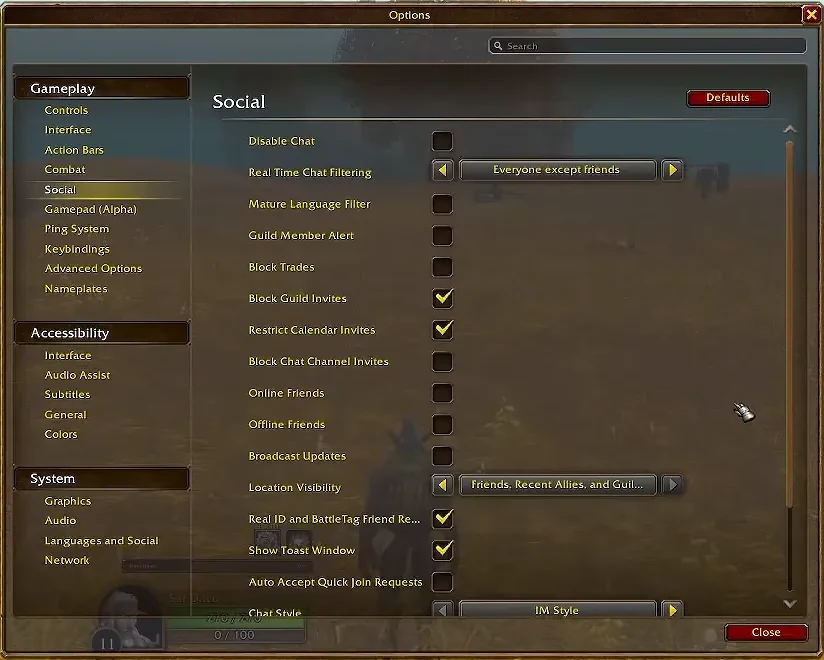
The clearest actionable chat guidance in the available Forever evidence is in Social settings: the dated client names controls for channel invitations, guild invitations, trade requests, language filtering, and chat. Only some tooltips define exactly what they block. The channel-command strings below come from an extracted beta client snapshot; they are not confirmation that those commands currently register in Forever.
Social Controls in the Dated Client
The extracted Settings module loads Social settings for the Game addon and includes a Camelot override. Its records name these controls:
| Control | What the dated source establishes |
|---|---|
| Block Chat Channel Invites | Tooltip says it stops incoming channel invitations. |
| Block Guild Invites | Tooltip says it blocks all incoming guild invites. |
| Block Trades | Tooltip says it stops incoming trade requests. |
| Mature Language Filter | Tooltip only says it enables mature language filtering. |
| Disable Chat | A confirmation prompt guards it; client text says you cannot send or receive messages while chat is disabled. Muted or age-restricted accounts cannot change it. |
These are useful labels when looking through Social settings, but the dated client code does not prove their current in-game presentation or behavior. In particular, an invitation control does not establish that it hides messages in Trade chat or another channel. The extracted list contains no verified control for blocking whispers, and it does not document a separate channel-text spam filter.
Channel invites, trade requests, and guild invites have direct tooltip descriptions; the language-filter and Disable Chat text describe intent, not tested effects. To check your client, note its build and change one visible Social setting at a time, then repeat the same trigger and restore your prior preference if the result differs from what you need. This is a suggested local check, not a test performed for this page.
Channel Command Strings Are a Dated Reference
The October 3 extraction of beta build 1.60.1.70205 includes these strings and related shared handler code:
| Command in the snapshot | Recorded behavior or limit |
|---|---|
/join <channelname> [password] | Help text says it may create or join a named channel. |
/leave <channelname> | Handler takes a channel name and leaves it. |
/chatlist, /chatinfo | Strings and handlers cover listing one or all channels. |
/chat, /chathelp | Command strings appear; live behavior was not tested. |
Treat this as a dated source reference, not a live command tutorial. The handler code checks the active game mode before registering commands, and the inspected addon manifests do not settle its Forever load path. The Forever client was not launched for this check. The default channel roster and the availability of each command therefore remain unverified.
The same snapshot contains /who and /r strings. Its /who handler can return without querying when IngameWhoListDisabled is active, while /r uses the previous tell target. The snapshot also contains a /w string, but whisper routing and a way to block private tells in Forever were not verified. It also provides no chat-specific evidence for reach across rulesets, factions, realms, or channel partitions. Blizzard's grouping rules describe grouping, not chat recipients.
Check Dated Issue Notes
Blizzard's October 1 Known Issues thread is a dated report, not a complete statement of current chat behavior. The October 8 maintenance post said fuller notes and Known Issues would follow later that day. Recheck dated Blizzard posts when troubleshooting, and separate a reported issue from a confirmed current limitation.

Every row carries an evidence icon: Confirmed, Planned, Reported, Unverified or Not announced. Hover, focus or tap one for its source. Where sources disagree, both stay on the page. How we verify
Sources
- Choose Your Ruleset in World of Warcraft: ForeverChoose Your Ruleset in World of Warcraft
- WoW Forever Beta Known Issues – October 1
- Beta Realm Maintenance – October 8