
Forever Beacon: Reference Addon for WoW Forever
 By DecarebiaPublished Updated Beta reports from build 1.60.1.69913
Download Forever Beacon to see interface 16001 code that guards secret values instead of doing math on them. This site has reviewed its code but not run it in a Forever client.
Ask Our Sweaty Degenerate AI About Forever Beacon
Health Bar Setup, Beta Install, Probe Output, Compartment Entry, Saved Notes & More
Anything our guides cover. Answers come from this page and the rest of our guides, with the real values charted and the guide sections linked. It's AI, so check the source before you quote it.
A small test addon for the Forever beta. It keeps notes, draws your health bar without doing math on it, and prints what the client reports about itself. It does not meter damage, read the combat log or cast for you.
- TOC interface
- 16001
- Health bar without math
- No math on health
- In-client test
- Not run yet
- Addon compartment
- Untested here
This reference addon is part of the WoW Forever addon developer guide. To see why it handles health values and frame positioning this way, read WoW Forever addon patterns and the Forever API cheat sheet. For smaller snippets, see the code templates.
Beacon came to this site with the guide's source pack, which names its author "Forever Codex". The code below is byte-for-byte what you download, apart from line endings.
Download
The zip holds a ForeverBeacon folder with both files. Unzip it into your beta AddOns folder.
What the Addon Does
| Feature | What it does |
|---|---|
| Movable panel | Dragging does nothing while InCombatLockdown is true. The panel remembers where you drop it. |
| Guarded names | Zone and character name show only when issecretvalue says they are plain. Otherwise you are "Adventurer". |
| Health bar without math | The status bar gets UnitHealth and UnitHealthMax directly. The label says sealed or open, and never computes or prints a percent. |
| Slash commands | /fb note saves a line. /fb toggle shows or hides the panel. /fb probe reports build, interface, project ID, C_Spell and whether health is secret. /fb reset wipes Beacon's saved data and reloads the UI. |
| Addon compartment entry | Registered in the TOC, so you need no minimap button library. Not yet confirmed on a Forever client. |
| Spell data loading | The probe looks up Hearthstone with C_Spell.GetSpellInfo(8690) and requests a load if the record is not cached. |
Install on the Beta
- Create the folder
World of Warcraft\_classic_beta_\Interface\AddOns\ForeverBeacon\, or unzip there. - Save the TOC as
ForeverBeacon.tocand the Lua asForeverBeacon.lua. - Start the game client.
- Type
/fb help. - If notes vanish between sessions, check your build.
The folder and TOC names must match. If you add the folder while the game is running and Beacon does not appear after /reload, restart the client. If the addon is missing or marked out of date, check the interface number with /dump select(4, GetBuildInfo()) and update the TOC. Players reported a beta SavedVariables loading bug in mid-September, and a September 25 report says build 70009 fixed it. See the common AI addon pitfalls.
Source Code
## Interface: 16001
## Title: Forever Beacon
## Notes: Secret-safe session journal and API probe for WoW: Forever. A Forever Codex proof of concept.
## Author: Forever Codex
## Version: 0.1.0
## SavedVariables: ForeverBeaconDB
## IconTexture: Interface\Icons\INV_Misc_Note_01
## Category: Miscellaneous
## AddonCompartmentFunc: ForeverBeacon_OnCompartmentClick
## AddonCompartmentFuncOnEnter: ForeverBeacon_OnCompartmentEnter
## AddonCompartmentFuncOnLeave: ForeverBeacon_OnCompartmentLeave

ForeverBeacon.lua-- Forever Beacon 0.1.0
-- Proof of concept for World of Warcraft: Forever (beta interface 16001).
-- Secret-safe. No combat log. No secure snippets. No Classic API.
-- Install: World of Warcraft\_classic_beta_\Interface\AddOns\ForeverBeacon\
-- Then fully restart the client. /fb help
local addonName, ns = ...
local PREFIX = "|cffd4a85a[Beacon]|r "
local defaults = {
enabled = true,
welcomeShown = false,
point = { point = "CENTER", rel = "CENTER", x = 0, y = 80 },
notes = {},
}
ns.db = nil
local frame = CreateFrame("Frame")
local events = {}
local pending = {}
local function Queue(action)
if InCombatLockdown() then
pending[#pending + 1] = action
else
action()
end
end
local function IsSecret(value)
if type(issecretvalue) ~= "function" then
return false
end
return issecretvalue(value) and true or false
end
local function SafeString(value, fallback)
if value == nil or IsSecret(value) then
return fallback
end
return tostring(value)
end
local function Say(text)
DEFAULT_CHAT_FRAME:AddMessage(PREFIX .. text, 0.95, 0.92, 0.86)
end
local function MergeDefaults(db)
for key, value in pairs(defaults) do
if db[key] == nil then
if type(value) == "table" then
local copy = {}
for innerKey, innerValue in pairs(value) do
copy[innerKey] = innerValue
end
db[key] = copy
else
db[key] = value
end
end
end
end
function events:ADDON_LOADED(loaded)
if loaded ~= addonName then
return
end
-- Beta note: Forever has been observed writing SavedVariables and then
-- failing to restore them. Code the correct pattern anyway.
ForeverBeaconDB = ForeverBeaconDB or {}
MergeDefaults(ForeverBeaconDB)
ns.db = ForeverBeaconDB
ns:BuildPanel()
self:UnregisterEvent("ADDON_LOADED")
end
function events:PLAYER_LOGIN()
if not ns.db then
return
end
if not ns.db.welcomeShown then
ns.db.welcomeShown = true
Say("online. /fb help. This panel draws health. It never does maths on it.")
end
ns:Refresh()
end
function events:PLAYER_ENTERING_WORLD()
ns:Refresh()
end
function events:ZONE_CHANGED_NEW_AREA()
ns:Refresh()
end
function events:PLAYER_REGEN_ENABLED()
for i = 1, #pending do
pending[i]()
end
wipe(pending)
end
function events:UNIT_HEALTH(unit)
if unit == "player" then
ns:PaintHealth()
end
end
function events:UNIT_MAXHEALTH(unit)
if unit == "player" then
ns:PaintHealth()
end
end
function ns:PaintHealth()
local bar = ns.healthBar
if not bar then
return
end
local cur = UnitHealth("player")
local maxv = UnitHealthMax("player")
-- Status bars accept secrets. Arithmetic, comparison, and print do not.
bar:SetMinMaxValues(0, maxv)
bar:SetValue(cur)
if ns.healthLabel then
if IsSecret(cur) or IsSecret(maxv) then
ns.healthLabel:SetText("Vitals sealed")
else
ns.healthLabel:SetText("Vitals open")
end
end
end
function ns:Refresh()
if not ns.zoneText then
return
end
local zone = SafeString(GetZoneText(), "Unknown wilds")
local name = SafeString(UnitName("player"), "Adventurer")
ns.zoneText:SetText(name .. " · " .. zone)
ns:PaintHealth()
ns:PaintNotes()
end
function ns:PaintNotes()
if not ns.noteText or not ns.db then
return
end
local lines = ns.db.notes
if #lines == 0 then
ns.noteText:SetText("No field notes. /fb note your text")
return
end
local buf = ""
local startAt = #lines - 4
if startAt < 1 then
startAt = 1
end
for i = startAt, #lines do
if buf ~= "" then
buf = buf .. "\n"
end
buf = buf .. lines[i]
end
ns.noteText:SetText(buf)
end
function ns:BuildPanel()
local panel = CreateFrame("Frame", "ForeverBeaconPanel", UIParent, "BackdropTemplate")
panel:SetSize(280, 168)
panel:SetFrameStrata("MEDIUM")
panel:SetClampedToScreen(true)
panel:SetMovable(true)
panel:EnableMouse(true)
panel:RegisterForDrag("LeftButton")
panel:SetScript("OnDragStart", function(self)
if InCombatLockdown() then
return
end
self:StartMoving()
end)
panel:SetScript("OnDragStop", function(self)
self:StopMovingOrSizing()
local point, _, rel, x, y = self:GetPoint(1)
if ns.db and point and rel then
ns.db.point = { point = point, rel = rel, x = x, y = y }
end
end)
local p = ns.db and ns.db.point
if p and p.point then
panel:SetPoint(p.point, UIParent, p.rel or "CENTER", p.x or 0, p.y or 80)
else
panel:SetPoint("CENTER", UIParent, "CENTER", 0, 80)
end
panel:SetBackdrop({
bgFile = "Interface\\Tooltips\\UI-Tooltip-Background",
edgeFile = "Interface\\Tooltips\\UI-Tooltip-Border",
tile = true,
tileSize = 16,
edgeSize = 12,
insets = { left = 3, right = 3, top = 3, bottom = 3 },
})
panel:SetBackdropColor(0.07, 0.06, 0.05, 0.92)
panel:SetBackdropBorderColor(0.83, 0.66, 0.35, 0.9)
local title = panel:CreateFontString(nil, "OVERLAY", "GameFontNormal")
title:SetPoint("TOPLEFT", 12, -10)
title:SetText("Forever Beacon")
local zone = panel:CreateFontString(nil, "OVERLAY", "GameFontHighlightSmall")
zone:SetPoint("TOPLEFT", 12, -28)
zone:SetPoint("TOPRIGHT", -12, -28)
zone:SetJustifyH("LEFT")
ns.zoneText = zone
local bar = CreateFrame("StatusBar", nil, panel)
bar:SetPoint("TOPLEFT", 12, -48)
bar:SetPoint("TOPRIGHT", -12, -48)
bar:SetHeight(12)
bar:SetStatusBarTexture("Interface\\TargetingFrame\\UI-StatusBar")
bar:SetStatusBarColor(0.55, 0.12, 0.12, 1)
bar:SetMinMaxValues(0, 1)
bar:SetValue(0)
ns.healthBar = bar
local healthLabel = panel:CreateFontString(nil, "OVERLAY", "GameFontDisableSmall")
healthLabel:SetPoint("TOPLEFT", 12, -64)
healthLabel:SetText("Vitals")
ns.healthLabel = healthLabel
local note = panel:CreateFontString(nil, "OVERLAY", "GameFontHighlightSmall")
note:SetPoint("TOPLEFT", 12, -82)
note:SetPoint("BOTTOMRIGHT", -12, 12)
note:SetJustifyH("LEFT")
note:SetJustifyV("TOP")
ns.noteText = note
if ns.db and not ns.db.enabled then
panel:Hide()
end
ns.panel = panel
end
local function Probe()
local build = SafeString(select(2, GetBuildInfo()), "?")
local iface = SafeString(select(4, GetBuildInfo()), "?")
local project = SafeString(WOW_PROJECT_ID, "?")
Say("build " .. build .. " interface " .. iface .. " WOW_PROJECT_ID " .. project)
if not IsSecret(WOW_PROJECT_ID) and WOW_PROJECT_ID == 1 then
Say("Project id is 1 (Mainline). Forever reports retail. Do not take a Classic branch.")
end
if type(C_Spell) == "table" and type(C_Spell.GetSpellInfo) == "function" then
local info = C_Spell.GetSpellInfo(8690)
if info and not IsSecret(info.name) then
Say("C_Spell.GetSpellInfo(8690) -> " .. SafeString(info.name, "sealed"))
elseif info == nil then
if type(C_Spell.RequestLoadSpellData) == "function" then
C_Spell.RequestLoadSpellData(8690)
end
Say("Hearthstone is not cached. Requested a load. Probe again after the result event.")
else
Say("Spell name is sealed. Leave it sealed.")
end
else
Say("C_Spell.GetSpellInfo is missing on this build. Retest before you ship spell UI.")
end
if type(GetSpellInfo) == "function" then
Say("GetSpellInfo still exists here. Prefer C_Spell anyway.")
else
Say("GetSpellInfo is absent. Classic snippets that call it will error.")
end
local h = UnitHealth("player")
if IsSecret(h) then
Say("UnitHealth(player) is secret. The bar can draw it. Lua must not add to it.")
else
Say("UnitHealth(player) is plain right now. Do not assume that stays true in combat.")
end
end
function events:SPELL_DATA_LOAD_RESULT(spellID, success)
if spellID ~= 8690 then
return
end
if success and type(C_Spell) == "table" then
local info = C_Spell.GetSpellInfo(8690)
Say("Spell data arrived: " .. SafeString(info and info.name, "sealed"))
else
Say("Spell data load failed for 8690.")
end
end
SLASH_FOREVERBEACON1 = "/fb"
SLASH_FOREVERBEACON2 = "/foreverbeacon"
SlashCmdList["FOREVERBEACON"] = function(msg)
local text = msg or ""
local cmd, rest = text:match("^(%S*)%s*(.*)$")
cmd = (cmd or ""):lower()
if cmd == "" or cmd == "help" then
Say("/fb note <text> /fb toggle /fb probe /fb reset")
elseif cmd == "toggle" then
if not ns.db or not ns.panel then
return
end
Queue(function()
ns.db.enabled = not ns.db.enabled
if ns.db.enabled then
ns.panel:Show()
ns:Refresh()
else
ns.panel:Hide()
end
end)
elseif cmd == "note" then
if not ns.db then
return
end
if not rest or rest == "" then
Say("Usage: /fb note ferry timing on the west dock")
return
end
ns.db.notes[#ns.db.notes + 1] = rest
ns:PaintNotes()
Say("noted.")
elseif cmd == "probe" then
Probe()
elseif cmd == "reset" then
ForeverBeaconDB = nil
ReloadUI()
else
Say("Unknown command. /fb help")
end
end
function ForeverBeacon_OnCompartmentClick()
if not ns.db or not ns.panel then
return
end
Queue(function()
if ns.panel:IsShown() then
ns.db.enabled = false
ns.panel:Hide()
else
ns.db.enabled = true
ns.panel:Show()
ns:Refresh()
end
end)
end
function ForeverBeacon_OnCompartmentEnter(_, owner)
GameTooltip:SetOwner(owner, "ANCHOR_LEFT")
GameTooltip:SetText("Forever Beacon", 1, 0.82, 0.45)
GameTooltip:AddLine("Toggle the field journal.", 0.9, 0.9, 0.9)
GameTooltip:Show()
end
function ForeverBeacon_OnCompartmentLeave()
GameTooltip:Hide()
end
frame:SetScript("OnEvent", function(self, event, ...)
local handler = events[event]
if handler then
handler(self, ...)
end
end)
frame:RegisterEvent("ADDON_LOADED")
frame:RegisterEvent("PLAYER_LOGIN")
frame:RegisterEvent("PLAYER_ENTERING_WORLD")
frame:RegisterEvent("ZONE_CHANGED_NEW_AREA")
frame:RegisterEvent("PLAYER_REGEN_ENABLED")
frame:RegisterEvent("SPELL_DATA_LOAD_RESULT")
if frame.RegisterUnitEvent then
frame:RegisterUnitEvent("UNIT_HEALTH", "player")
frame:RegisterUnitEvent("UNIT_MAXHEALTH", "player")
else
frame:RegisterEvent("UNIT_HEALTH")
frame:RegisterEvent("UNIT_MAXHEALTH")
endWhat This Does Not Prove
This site has not run Beacon in a Forever client, on build 69913 or any later build. It is written to follow the published rules and the reported beta failures, so you can test those rules on your own client. If the probe says GetSpellInfo exists, or that health is plain, believe the probe over this page. That is the point of a reference addon.
What Secret Values Change for Beacon
The Warcraft Wiki says only "a limited set of native APIs" accept secret values from tainted code, and names StatusBar:SetValue as its example.Source: Secret Values, checked Sep 28, 2026. That is why PaintHealth passes the raw UnitHealth result straight to bar:SetValue(cur), with no subtraction, percent or comparison.
The health example is untested in a Forever client. No source we found verifies that SetMinMaxValues accepts a secret UnitHealthMax value.
The restrictions are specific. Tainted code may store a secret, pass it to a Lua function, or concatenate it into a string. It may not do arithmetic on it, compare it, take its length or use it as a table key. A blocked operation throws a Lua error immediately.
Why the Label Says "sealed" Instead of a Number
issecretvalue is the only test Beacon runs before it picks the health label. If either UnitHealth or UnitHealthMax comes back secret, the label reads "Vitals sealed," because a percent needs the division the client refuses.
SafeString guards the zone and character name the same way. When a value is secret, it substitutes "Unknown wilds" or "Adventurer," so the panel keeps drawing instead of throwing an error.
Reading What /fb Probe Reports
/fb probe prints the build, interface and WOW_PROJECT_ID on one line, then adds "Forever reports retail" when the ID is 1. WoW Forever Builds recorded that same value on beta build 69913.
The retained October 12 WFG probe on build 70338 instead records project ID 18, and Blizzard's client constants define WOW_PROJECT_CAMELOT = 18. Beacon's conditional "Forever reports retail" message will not appear for that value; the condition only labels diagnostic output and does not prevent the addon from loading. Beacon still logs the raw ID.Source: Blizzard's Camelot project constants, retained 70338 extract inspected Oct 13, 2026; separate WFG probe captured Oct 12. The mirror may show a later build.
For shared addon detection, compare WOW_PROJECT_ID with WOW_PROJECT_CAMELOT when that constant exists, then check the feature's API. The addon patterns guide shows the source-checked example. The retained wiki's WOW_PROJECT_MAINLINE plus LE_EXPANSION_LEVEL_CURRENT == LE_EXPANSION_CLASSIC example is historical and does not match the captured 70338 client; its TOC X-Game metadata option is a separate approach. The downloaded Beacon sample remains an untested reference addon, not the separate live probe.
The Spell Lookup Step
The probe calls C_Spell.GetSpellInfo(8690), where 8690 is the Hearthstone spell ID. That namespaced call returns one spellInfo table. The old global GetSpellInfo returns separate values, which is how Classic code reads it.Source: C_Spell.GetSpellInfo, checked Sep 28, 2026.
The wiki documents a nil return for a spell it cannot find. Beacon reads nil as "not cached yet," calls C_Spell.RequestLoadSpellData and reports the answer on SPELL_DATA_LOAD_RESULT. The wiki warns that this event can report failure when only partial data arrives, so a "load failed" line does not always mean the spell is missing.
How SavedVariables Load, and Why Notes Can Vanish
The client loads FrameXML, then addon code, then each addon's saved variables, firing ADDON_LOADED for that addon once its variables are back.Source: Saving variables between game sessions, checked Sep 28, 2026. PLAYER_LOGIN fires after every addon has loaded.
A default set at file scope gets overwritten when the saved value arrives. Beacon avoids that: it leaves ForeverBeaconDB alone until ADDON_LOADED, then fills in only the keys the saved table lacks.
What the Beta Bug Looked Like
A Blizzard Forums thread opened Sep 21, 2026 reported that saved data was written to disk correctly but came back empty at the next login. Other addon authors confirmed it the same week.Source: WOWF Beta: Addon SavedVariables appear to write correctly to disk but are not restored at startup, checked Sep 28, 2026.
A Sep 25, 2026 reply says build 70009, dated Sep 23, loads saved variables correctly again. That is one player's confirmation, not a Blizzard patch note, and Beacon's code did not change because of it.
Why the Panel Waits to Move or Hide
InCombatLockdown is true from PLAYER_REGEN_DISABLED until just before PLAYER_REGEN_ENABLED.Source: InCombatLockdown, checked Sep 28, 2026. During that window the wiki says the lockdown blocks moving a protected frame by resetting its anchors, though moves the player starts are still allowed.
Beacon's panel is not a protected frame, so the checks are a precaution, not a requirement. /fb toggle and the compartment click both go through Queue, which holds the action until PLAYER_REGEN_ENABLED and then runs it.
Dragging Is Refused, Not Queued
OnDragStart does not queue. It checks InCombatLockdown and simply ignores the drag, even though the wiki allows player-initiated moves. Drag again after combat, and OnDragStop saves the new position.
The Addon Compartment Entry, Still Unconfirmed
Beacon registers through three TOC fields, AddonCompartmentFunc, AddonCompartmentFuncOnEnter and AddonCompartmentFuncOnLeave. The wiki calls this automatic registration: the client calls the named global functions itself, with no RegisterAddon call.Source: Addon compartment, checked Sep 28, 2026. The code templates guide has the same stub on its own.
The click handler toggles ns.db.enabled and shows or hides the panel through Queue. The hover handlers only draw a tooltip. None of this has been confirmed on a Forever client.
What This Addon Does Not Attempt
Beacon never calls CombatLogGetCurrentEventInfo. Warcraft Forever's addon notes report that it is unavailable on this client, and that friendly UnitHealth arrives as a secret number.Source: Addons, checked Sep 28, 2026.
It also writes no secure attributes and calls no protected function such as ChatFrame_OpenChat. The same notes say a blocked protected call raises no Lua error, even inside pcall. The only signs are "Interface action failed because of an AddOn" and an AddOns panel counter that resets only on a full client restart. The addon pitfalls guide covers those traps.
Where Full Addons Stand
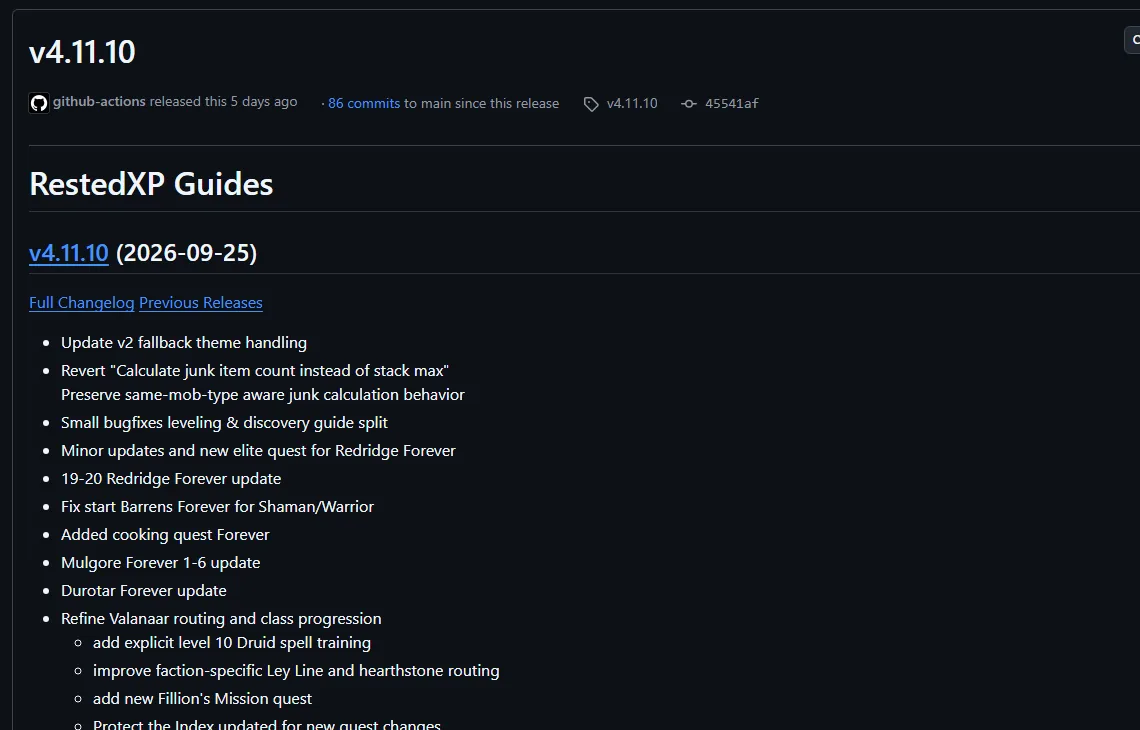
Beacon stays small on purpose. The free RestedXP guide addon is a larger addon already shipping Forever content: its Sep 25, 2026 release, v4.11.10, lists Forever route updates for Mulgore, Durotar and Redridge. Its v4.11.8 notes, from Sep 22, say it converted its Forever guides to a #forever tag, one way a shared codebase keeps Forever content apart.Source: RXPGuides releases on GitHub, checked Sep 28, 2026.

Key Facts
- TOC interface Changed16001 in the Forever Beta row of the Warcraft Wiki TOC table; confirm with /dump select(4, GetBuildInfo())Classic: Classic Era lists 11509 on the same table.
- Health bar without math New in ForeverFeeds UnitHealth to a StatusBar without math; names pass through issecretvalue
- In-client testBeacon has not been run in a Forever client by this site
- Addon compartment New in ForeverTOC fields are documented for Mainline; not yet tested on a Forever client here
Sources
- TOC formatWarcraft Wiki
- Secret ValuesWarcraft Wiki
- Addon compartmentWarcraft Wiki
- What the WoW Forever beta breaks for addons: secret health values, dead secure snippets, new APIsWoW Forever Builds
- AddonsWarcraft Forever
- WoW: Forever Will Have Addon Changes from MidnightWowhead
- WOWF Beta: Addon SavedVariables appear to write correctly to disk but are not restored at startupWorld of Warcraft Forums (player bug report)
- Saving variables between game sessionsWarcraft Wiki
- WOW_PROJECT_IDWarcraft Wiki
- InCombatLockdownWarcraft Wiki
- C_Spell.GetSpellInfoWarcraft Wiki
- SPELL_DATA_LOAD_RESULTWarcraft Wiki
- RXPGuides releasesRestedXP (GitHub)
- Blizzard client source: ProjectConstants.lua (retained build 70338; mirror may change)Blizzard Entertainment (source mirrored by Gethe)
- WoW Forever Guides · code review only